Zettlab D6 Nas Device Review: Real User Experience After 3 Months
I've been using the Zettlab D6 NAS device daily for about three months now. I bought it to centralize backups, run a small Plex server for my media, and keep a reliable local sync point for work files. I wanted something with multiple drive bays that wouldn't dominate my home office in noise or heat, and the D6 looked like a reasonable value on paper. What I found was a mix of pleasantly surprising practicalities and a few real-world annoyances that mattered in day-to-day use.
Introduction: Why I chose the D6
In my experience, buying a NAS is as much about the software ecosystem and support as it is about raw hardware. I was looking for a 6-bay chassis so I could start with a few drives and expand later, along with support for RAID configurations and the ability to run containers (Docker) or at least third-party apps like Plex. I also wanted decent performance on my gigabit LAN and low background noise so it wouldn't distract during work calls.
After comparing a handful of options, I decided to buy the Zettlab D6 because it checked several boxes at a price point I felt comfortable with. Over the last three months I've set it up, migrated data, used it as a media server, run automated backups, and even experimented with a few lightweight containerized services. Below is a detailed account of how that went.
First impressions and setup
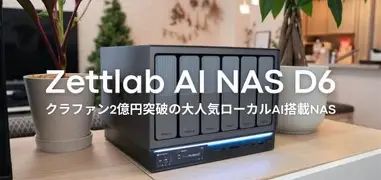
Out of the box, the unit felt solid and utilitarian. The build quality is not premium aluminum but a sturdy metal/plastic blend that gives me confidence in long-term reliability. Drive trays are tool-less and click in securely; I appreciated that because I swapped drives during initial setup more than once. The front panel LED layout is subdued — bright enough to be informative but not so bright that it lights up a dark room.
Setting up the D6 was straightforward. I connected it to my LAN, popped in three hard drives (I started with three 8TB drives and left room to expand), and followed the web-based setup wizard. The wizard guided me through basic network settings, creating a primary admin account, and choosing a storage layout. The interface is not as polished as some top-tier brands, but it remains usable and logical.
Storage management and data protection
One thing I value is clarity around disk and RAID health. The D6's storage manager shows disk status, SMART data, and gives options for RAID-like arrays. I configured my drives in a RAID 5 equivalent (it calls it “redundant array” in the UI), and migration to add a fourth drive later was painless — I initiated the expansion in the web UI, and the background rebuild ran without crashing any services. Rebuild times were long (as expected for high-capacity drives), but I could still stream media and access files while the array rebuilt.
What I noticed was that some of the more advanced options (schedulers for scrubs, tiering, or scheduling automatic verification) are present but tucked away. If you’re used to enterprise-class control panels, it takes a little poking around to find everything. Still, the core protections — RAID, SMART alerts, and basic scheduled checks — are there and they work reliably.
Performance: real-world speeds
On my gigabit LAN, what I found was consistent network-limited throughput: large sequential file transfers (big video files) typically hit around 110–115 MB/s from my desktop to the D6 and back. That matches what I expected from a single gigabit connection and made streaming 4K media over Plex very smooth for single-client playback.
Find top-rated Laptops & Computers products at great prices.
See Deals →Random small-file performance is where NAS devices tend to differ. For many small files, backup and sync operations felt slower than local SSD performance (obvious) but acceptable. My routine of nightly rsync-style backups and hourly photo uploads from my phone ran without errors, though initial backups of large numbers of small files took longer than I liked.
If you plan to do heavy virtualization or run multiple simultaneous heavy file transfers, I would recommend either 10GbE networking or adding SSDs as a cache tier where supported. For my use — backups, media serving, and occasional large syncs — the D6 performed well enough.
Software, apps, and media use
I primarily used the D6 for two things: as a centralized backup target and as a Plex server. Installing Plex (community/s…The app ecosystem is decent. There's a package center with core utilities (file sharing, backup agents, media servers) and a few third-party packages. I tried running a small Docker container for a personal service; the D6 supports containers but the management UI for Docker is more basic than I'd seen on higher-end NAS devices. If you intend to run many containers or complicated stacks, you'll either accept the simpler UI or manage via SSH and docker-compose yourself.
Reliability, noise, and heat
After three months of continuous operation, the device has been stable. I had one warning when a single drive reported rising SMART reallocated sector counts — I got the alert via email, removed the drive, replaced it, and rebuilt the array without incident. That workflow inspired confidence in the redundancy features.
Noise is a big deal for me because my NAS sits in my home office. I noticed that under light load the fans are quiet; I had to put my ear close to the chassis to notice them. Under sustained heavy load (large rebuilds, multiple transcodes) the fans ramp up noticeably, but even then the sound is more of a low whirr than a high-pitched whine. Heat management is competent — internal temperatures stayed within safe ranges and the unit's ventilation is adequate.
Remote access and mobile experience
Remote access worked, though setting it up required a little networking know-how. I used a combination of a dynamic DNS entry and a router port forward to reach the web UI remotely. The D6 offers cloud relay services in its settings, which simplify remote access if you prefer not to touch port forwarding, though I didn't rely on the relay for daily use.
Find top-rated Laptops & Computers products at great prices.
View Offers →Mobile apps for file browsing and photo backup did their job, but they feel functional rather than polished. Uploads from phone photo backups were reliable and resumed after intermittent cellular interruptions. The notifications system sent warnings for drive events and firmware updates, which I appreciated.
Support and firmware updates
Firmware updates arrive at a reasonable pace. In my experience the updates fixed bugs and occasionally added new features to the package manager. Support is likely to differ by region, but I reached out once with a configuration question and received a helpful reply within a couple of business days. I was pleased that updates didn't introduce regressions in my three-month window.
What I liked and what bothered me
- What I appreciated: Solid hardware feel; tool-less drive trays; reliable RAID rebuilds; quiet under light load; stable remote/file access; reasonable package availability for media and backups.
- What bothered me: UI is functional but not as polished as some competitors; Docker experience is limited in the UI; some advanced maintenance options are harder to find; heavy simultaneous transcodes tax the CPU quickly.
Pros & Cons
- Pros
- Practical, expandable 6-bay design that lets you grow storage over time.
- Quiet during normal operation — suitable for a home office.
- Reliable RAID management and successful rebuilds in my tests.
- Good value for the hardware you get versus price (in my purchasing experience).
- Decent package center for media and backup apps.
- Cons
- Software UI feels less polished and sometimes hides advanced options.
- Limited built-in Docker UX — power users may prefer command-line management.
- CPU limits visible during multiple simultaneous transcodes.
- Initial small-file backup performance can be slow; overnight indexing sometimes spikes load.
Comparison: Zettlab D6 vs. a few alternatives
| Feature | Zettlab D6 (my unit) | Typical Midrange Competitor | Typical Value 4-bay |
|---|---|---|---|
| Bays | 6 bays — easy expansion | 4 bays (expandable via chassis) | 4 bays, compact |
| UI / Software polish | Functional, a bit utilitarian | Polished, refined UX | Basic, limited features |
| Performance on gigabit LAN | Network-limited ~110–115 MB/s sequential | Similar; some models have faster CPUs for transcodes | Comparable sequential performance |
| Container support | Supported — basic UI for Docker | Often excellent Docker/VM support | Often limited or absent |
| Noise | Quiet at idle, moderate under load | Varies; premium models quieter and better fan curves | Generally quiet but less cooling capacity |
| Value | Strong value for 6-bay capacity | Higher price for more polished software | Lowest price but fewer features |
Buying guide: How to decide if the Zettlab D6 is right for you
If you're considering the D6, here are the key things I looked for and recommend you verify before buying. These points reflect what mattered to me after three months of ownership.
- How many bays do you need? I wanted 6 bays to start with room to grow. If you plan to expand drives often or want a higher RAID level without losing too much capacity, choose a 6-bay or larger unit; otherwise a 4-bay might be sufficient.
- Check supported drive types and hot-swap trays — I appreciated the tool-less trays on the D6. Make sure the model you buy supports the size and speed (3.5" or 2.5") of drives you plan to use.
- CPU and RAM for your workload — if you intend to transcode video for multiple clients or run many containers, you’ll want a stronger CPU and more RAM. For backups and single-stream media, a modest CPU is fine.
- Network options — does the unit have 2.5GbE/10GbE options or only gigabit? If you plan to move lots of large files quickly, consider models with faster networking or the ability to add NICs.
- Software ecosystem — look at the package center, backup clients, and container support. If you rely on specific third-party apps, confirm they’re available or can run in a container.
- Noise and placement — think about where you’ll place the NAS. If it's going in a bedroom or office, look for quieter models or plan to move it to a closet with proper ventilation.
- Warranty and support — check warranty length and support responsiveness in your region. In my case, email support answered within business days and the firmware track record was reasonable.
- Power consumption and UPS compatibility — the D6 runs continuously; make sure your UPS can handle it and that the NAS integrates with UPS shutdown signals to avoid abrupt power loss.
Practical tips from my experience
- Plan drive population: start with mirrored or RAID-Z style redundancy rather than a single disk — the convenience of redundancy saved me hours when replacing a failing drive.
- Enable SMART email alerts right away; I caught a drive issue early because of proactive alerts.
- Use scheduled scrubs and checks; I set a monthly data verification that helped me feel confident about long-term integrity.
- If you want better small-file throughput, consider using a separate SSD for hot data or look for units that support SSD caching.
- Backup the NAS: don’t treat the NAS as the only backup. I run cloud snapshots of critical folders as an additional safety net.
Conclusion
After three months with the Zettlab D6, my overall impression is positive. In my experience it's a solid, pragmatic NAS that delivers reliable storage, quiet daily operation, and a usable app ecosystem for backups and media serving. What I found was that it doesn't chase premium polish in the UI or offer unbounded CPU headroom for heavy multi-transcoding — but for the majority of home-office and media-server tasks it handled everything I asked of it without drama.
If you want a roomy 6-bay device that balances price and practical features, the D6 is worth serious consideration. If you prioritize a very polished UI, deep virtualization/Docker features with a slick management console, or heavy simultaneous transcoding, you may want to compare higher-tier options or plan for network and CPU upgrades. For my needs — backups, Plex media serving, and general file storage — the Zettlab D6 has been dependable, and I'm comfortable recommending it to folks with similar priorities.