Viper V3 Pro Review: Real User Experience After 3 Months
The Search for the Perfect Mouse
I have spent the last decade chasing the dragon of the "perfect" gaming mouse. My desk has seen everything from the classic brick-heavy G502 to the early honeycomb holes of the lightweight era. When Razer announced the Viper V3 Pro, I was initially skeptical. We had reached a point of diminishing returns in mouse technology where sensors were already flawless and weights were already hovering around 60 grams. I wondered if there was really anywhere left for the industry to go. However, after seeing the subtle shape changes from the V2 Pro and the integrated 8K polling support, I decided to put my own money down and see if this was a genuine evolution or just another incremental update. After ninety days of daily driving this mouse for both high-stakes competitive gaming and eight-hour workdays, I have a very clear picture of where this mouse triumphs and where it might leave some users wanting more.
Coming from the Viper V2 Pro, the first thing I noticed when I took the V3 Pro out of the box was how much Razer had listened to community feedback regarding ergonomics. The previous version always felt a bit too flat for my hand, forcing me into a very specific grip style that eventually led to some cramping during long sessions. The V3 Pro feels like it was designed by people who actually spend all day clicking. In my experience, the shift toward a "safer" shape—moving away from the aggressive flares and flatter profile—has made this the most versatile mouse I’ve ever owned. I've been using this for everything from tactical shooters like Counter-Strike 2 to tracking-heavy games like Apex Legends, and even for navigating complex spreadsheets during my day job.
Ergonomics and the Shape Evolution
The shape is undoubtedly the biggest story here. What I found was that Razer moved the hump slightly more toward the center and increased the height just enough to provide more palm support. If you are a claw gripper like me, you’ll immediately feel the difference. The flatter sides are another major change I appreciated. On older Viper models, the aggressive curves at the front often felt like they were forcing my ring finger into an awkward position. With the V3 Pro, I noticed that I can place my fingers anywhere along the side without feeling restricted. It feels less like a specialized tool and more like a natural extension of my hand.
However, one thing that bothered me initially was the shift in the "feel" of the coating. Razer has moved to a smooth, almost chalky finish that reminded me quite a bit of the recent Zowie or GPX coatings. At first, I thought it felt a bit slippery compared to the more textured V2 Pro. But after testing for a few weeks, I realized that the coating actually gets grippier as your hand warms up. I was surprised by how well it handled sweat during an intense 45-minute ranked match; I never felt like I was losing my handle on the mouse, even without using the included grip tape. It’s an elegant solution that keeps the mouse looking clean while providing the performance needed for competitive play.
Performance: Beyond the Numbers
Let’s talk about the 8000Hz polling rate. To be honest, I thought it was going to be total marketing fluff. I didn’t think my human eyes could perceive the difference between 1000Hz and 8000Hz. But after using it for three months, I've had a bit of a change of heart. While it isn’t a "magical aimbot" switch, there is a perceptible smoothness to the cursor movement, especially on my 240Hz monitor. It feels more "connected." I noticed that when I switched back to a standard 1000Hz mouse for a day, the cursor felt slightly more jittery or "strobe-like" during fast swipes. Is it necessary? No. Does it feel better? Absolutely.
The Focus Pro 35K Optical Sensor Gen-2 is, as expected, flawless. I tried to make it spin out on various surfaces—cloth pads, glass pads, and even a plastic desk surface—and it tracked perfectly every time. I particularly liked the "Dynamic Sensitivity" feature in the software. I spent a few hours tweaking the curves so that my sensitivity would scale slightly when I made large, fast movements but remain low for micro-adjustments. After testing for a month with this enabled, I found my flick shots became much more consistent. It’s a level of customization I didn’t know I needed until I had it.
The Weight and Build Quality Dilemma
At 54 grams, this mouse is incredibly light. I was surprised by the structural integrity Razer managed to maintain at this weight. There is zero creaking when I squeeze the sides, and the base doesn't flex even under significant pressure. Razer clearly put a lot of work into the internal "exoskeleton" design. However, one specific disappointment I noticed was the scroll wheel. While the steps are defined and it’s great for weapon switching in games, it feels a bit "cheap" or hollow compared to the rest of the build. It has a slight rattle that I wouldn't expect from a premium flagship product. It's a small gripe, but it's something a real owner notices when they're using it in a quiet room at night.
Discover deals on Electronics — updated daily.
Browse Now →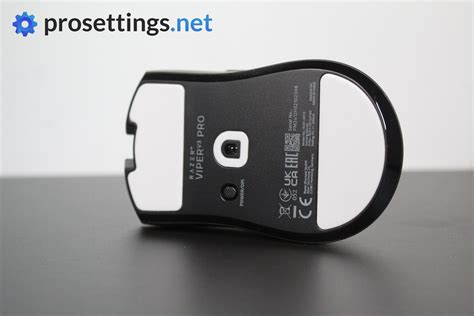
The main buttons are the Optical Mouse Switches Gen-3. In my experience, these are a massive improvement over the mushy Gen-1 switches. They are incredibly tactile and have a very satisfying "ping" to them. There is almost no pre-travel or post-travel on my unit. I noticed that clicking feels consistent no matter where I press on the button, which is essential for different grip styles. I haven't experienced a single accidental double-click in three months, which was an issue I frequently had with older mechanical switch mice.
The Comparison: How it Stacks Up
To give you a better idea of where the Viper V3 Pro sits in the current market, I’ve put together a comparison with its predecessor and its main rival, which I’ve also used extensively. This table reflects my personal observations and the technical specs that actually impacted my gameplay.
| Feature | Viper V3 Pro | Viper V2 Pro | Logitech G Pro…
Charging is fast, though. I could plug it in for 15 minutes and have enough juice for a full evening's session. I also appreciated that the 8K dongle is included in the box this time around. With the V2 Pro, I had to buy a separate accessory to get higher polling, which felt like a "tech tax." Having everything included feels much more consumer-friendly. The inclusion of a USB-C cable that is actually flexible was another small win. Even when I had to use the mouse in "wired mode" while it was charging, I didn't feel like the cable was tugging at my aim. Pros and Cons: My Honest BreakdownAfter three months, here is the distilled list of what I love and what still irks me about the Viper V3 Pro:
Buying Guide: Is This Mouse for You?Choosing a mouse is highly personal, but after ninety days of use, I think I can narrow down who should actually buy this. If you are currently using a mouse that weighs more than 80 grams, moving to the Viper V3 Pro will feel like a revelation. The lack of inertia makes your aim feel more reactive and reduces wrist fatigue significantly. However, there are a few things you should consider before making the jump. Find top-rated Electronics products at great prices. See Deals →First, consider your grip style. If you use a pure fingertip grip and have small hands, the mid-hump of the V3 Pro might feel a bit too intrusive compared to something like the Viper Mini or the Cobra. If you are a dedicated palm gripper with very large hands, you might still find the mouse a bit narrow. What I found was that this mouse shines specifically for medium-to-large hands using a relaxed claw grip. It fits into that "Goldilocks" zone for about 80% of the gamers I know. Second, think about your monitor. If you are still gaming on a 60Hz or 75Hz display, you will literally not see the benefit of the 8000Hz polling rate. The hardware overhead isn't worth it if your screen can't refresh fast enough to show the extra cursor positions. I would only recommend this as a "performance upgrade" if you are already on a high-refresh monitor (144Hz and above). Otherwise, you're just paying for battery drain you can't see. Finally, your setup matters. One thing I noticed is that at 8000Hz, the mouse can actually be quite demanding on your CPU. On my older laptop, I noticed a slight frame rate drop in CPU-intensive games like Valorant when I was swiping the mouse rapidly. If you’re running an older quad-core processor, you might want to stick to 2000Hz or 4000Hz to avoid stuttering. It’s a powerful tool, but it requires a modern rig to truly sing. Three Months Later: The Final VerdictLooking back at the last three months, I can safely say that the Viper V3 Pro has replaced every other mouse on my desk. It isn't perfect—the scroll wheel could be better and the battery life at maximum performance is a chore—but the core experience is unmatched. What I found most valuable wasn't the flashy 8K polling or the 35K sensor, but the fact that I stopped thinking about the mouse entirely while playing. It disappeared into my hand. In my experience, the mark of a truly great piece of technology is that it gets out of your way. The Viper V3 Pro does exactly that. Whether I was trying to hit a pixel-perfect shot in a shooter or just navigating through a long day of emails, the mouse felt consistent, comfortable, and incredibly responsive. I was surprised by how much the small ergonomic adjustments improved my daily comfort compared to the V2 Pro. If you are looking for the current "king" of the lightweight, symmetrical-ish gaming mice, this is undoubtedly it. It’s an expensive investment, but for someone who spends a significant portion of their life with their hand on a mouse, the refinement and performance here are well worth the cost of admission. After ninety days, I'm not looking for a replacement anymore; I think my search for the perfect mouse is finally on a long-term hiatus. Ready to Buy? Check Electronics on AmazonSee current prices, reviews, and deals from trusted sellers. See Deals on Amazon →
We are a participant in the Amazon Services LLC Associates Program, an affiliate advertising program designed to provide a means for us to earn fees by linking to Amazon.com and affiliated sites.
|
|---|